

Send to Kindle for Mac (Looking for the PC version?)
Reading your personal documents on a Kindle has never been easier
- Send personal documents to your Kindle from your Mac.
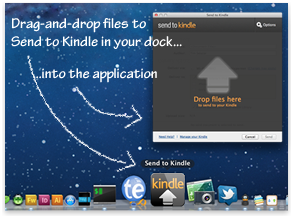
- Drag and drop one or more documents on to the Send to Kindle icon in your Dock or launch the application and drag and drop one or more documents on to it.
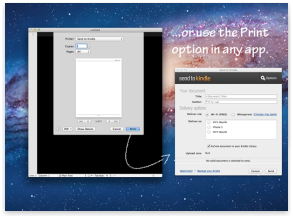
- From any Mac application that can print, select the print menu and choose Send to Kindle.
- From Finder, simply control-click on one or more documents and choose Send to Kindle.
- Choose to archive documents in your Kindle library, where you can re-download them conveniently at any time.
When you download and install, Send to Kindle will appear on your Dock. Send to Kindle will also appear when you control-click on a file from Finder or in the print dialog of any Mac application.
You can download archived personal documents from your Kindle Library on Kindle Keyboard, Kindle, Kindle Touch, Kindle for Android, Kindle for iPad, Kindle for iPhone and Kindle for iPod touch. Whispersync of notes, highlights, bookmarks along with last page read is available on your archived personal documents that have been converted into Kindle format. Learn more about Kindle Personal Document Service here.
System Requirements
- A Mac with a 500 MHz Intel processor or faster
- At least 512MB of RAM
- 100MB of available disk space
- Mac OS X v10.6 (Snow Leopard) or Mac OS X v10.7 (Lion)
By downloading or using the Send to Kindle app, you are agreeing to the Kindle License Agreement and Terms of Use (the “Agreement“). The Send to Kindle app is “Software“ under the Agreement.